
All-in-One Business Suite for Teams
Overview
Apptivo offers a comprehensive business suite designed to streamline operations across multiple departments. With over 40 integrated applications, the platform enables seamless data sharing across modules, eliminating the need for duplicate data entry and reducing the risk of inconsistencies. This unified approach supports teams in managing customer relationships, financial workflows, project execution, and internal operations from a single ecosystem.
Target users include small to mid-sized businesses, project managers, sales teams, finance departments, and HR professionals who require coordinated tools for daily operations. The software is particularly suited for organizations seeking to consolidate fragmented systems into a centralized platform. Real-world use cases include managing client pipelines in sales, generating and sending invoices with automated payment processing, tracking employee time against projects, and maintaining supply chain records.
The developer, Apptivo, has positioned this product as a scalable solution for growing businesses. While specific company details are not provided, the breadth of functionality suggests a focus on enterprise-level workflow integration. The software supports cross-functional collaboration by ensuring that data entered in one module—such as a customer record in CRM—is immediately accessible in related apps like invoicing or project management.
Key Features & Capabilities
- CRM Management – Organize contacts, track leads and opportunities, monitor sales funnels, manage help desk tickets, and coordinate field work via work orders. Data flows directly from CRM to other modules, enabling consistent follow-ups and accurate reporting.
- Estimates, Invoicing & Online Payments – Create custom estimates and invoices from projects, timesheets, or service agreements. Send invoices directly via email and accept payments through PayPal, Google Checkout, or Authorize.net. Generate printable receipts upon payment confirmation.
- Project Management & Time Tracking – Plan projects with milestones, sub-projects, and activities. Track time using timesheets and request approvals from managers or clients. All time entries can be billed directly to projects or customers.
- Human Resources Tools – Maintain employee records, organize teams, manage recruitment processes, and track employee performance within the platform.
- Supply Chain & Inventory Management – Record orders, monitor inventory levels, and maintain databases of suppliers, distributors, and manufacturers. This supports efficient procurement and fulfillment workflows.
These features are designed to work in concert, allowing users to initiate a task in one area—such as creating a sales estimate—and seamlessly transition to invoicing or project planning without re-entering data. The integration model reduces manual effort and enhances accuracy across business processes.
User Interface, Workflow & Performance
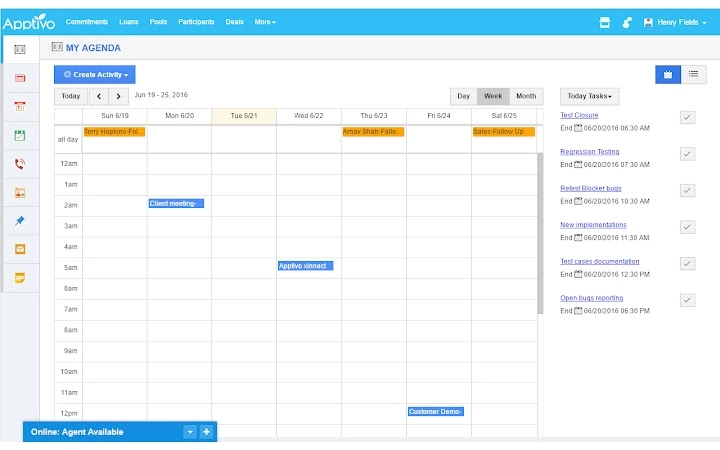
The user interface is structured around a modular dashboard, allowing users to access different apps through a unified navigation panel. The layout is clean and intuitive, with consistent design patterns across modules, which supports faster onboarding and reduces learning curves. Navigation is primarily menu-driven, with quick access to frequently used tools and recent activities.
Workflow efficiency is enhanced by the interconnected nature of the apps. For example, a sales lead captured in the CRM can be converted into a project, with time tracking initiated immediately. The system supports role-based access, enabling administrators to assign permissions based on team roles.
Performance observations are based on general software behavior patterns. The developer did not specify resource usage details. Stability is expected to be consistent given the integrated architecture, though actual performance may vary depending on network conditions and data volume. The software runs as a desktop application, which may offer faster access than web-only alternatives, though exact CPU or RAM behavior was not disclosed.
Compatibility & System Requirements
Apptivo is available for both Windows and Mac operating systems. The current version is 2024.1.0, with an installation size of 2.5 GB. This suggests a feature-rich application that includes multiple tools and supporting libraries.
Exact system requirements were not listed. Compatibility information is limited to the operating systems mentioned. Users should ensure their devices meet standard desktop application requirements for running modern software. The developer did not provide additional system requirements.
Pros and Cons
Pros
- 40+ integrated applications across CRM, finance, HR, and supply chain
- Eliminates duplicate data entry through cross-module data sharing
- Supports online payments via PayPal, Google Checkout, and Authorize.net
- Free to use with no cost barrier for entry
- Centralized platform reduces tool fragmentation
Cons
- Exact system requirements not specified
- No information on update frequency or release cycle
- Performance under heavy data loads not documented
- Limited transparency about security protocols
- Desktop version may require periodic maintenance or updates
FAQ Section
Is Apptivo compatible with Windows and Mac?
Yes, Apptivo is available for both Windows and Mac operating systems.
Is the software secure to use?
While the developer did not provide specific security details, the software operates as a desktop application, which may offer a more controlled environment compared to cloud-only solutions.
How often are updates released?
The release date for the current version is 2024-04-15. Information on update frequency was not provided.
What type of license does Apptivo use?
Apptivo is offered as a free software tool with no licensing fees required for use.
Can I use Apptivo offline?
Information on offline functionality was not specified. The software may require an internet connection for full feature access.
Final Thoughts
Apptivo delivers a powerful, all-in-one business solution that integrates essential tools for modern organizations. Its strength lies in the seamless connection between modules, enabling teams to operate efficiently without switching between disjointed platforms. The inclusion of CRM, invoicing, project management, HR, and supply chain tools in a single suite makes it a compelling choice for businesses aiming to simplify operations.
While some technical details remain unspecified, the free pricing model lowers the barrier to adoption. The software is ideal for teams that value integration, data consistency, and workflow automation. For businesses looking to centralize their operations and reduce administrative overhead, Apptivo offers a robust foundation.
Download Apptivo now







